8.8 PEcAn Docker Architecture
- Overview
- PEcAn’s
docker-compose - Top-level structure
traefikrabbitmqpostgresbetyrstudiodocspecan(web)monitorexecutorapi- Model-specific containers
8.8.1 Overview
The PEcAn docker architecture consists of many containers (see figure below) that will communicate with each other. The goal of this architecture is to easily expand the PEcAn system by deploying new model containers and registering them with PEcAn. Once this is done the user can now use these new models in their work. The PEcAn framework will setup the configurations for the models, and send a message to the model containers to start execution. Once the execution is finished the PEcAn framework will continue. This is exactly as if the model is running on a HPC machine. Models can be executed in parallel by launching multiple model containers.
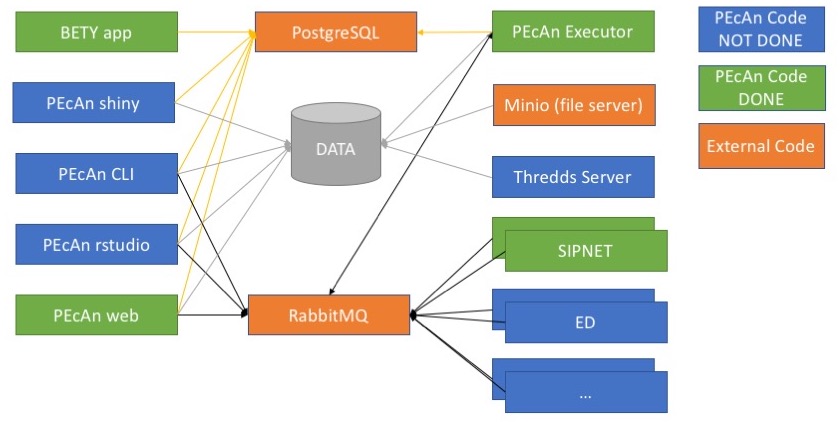 As can be seen in the figure the architecture leverages two standard containers (in orange). The first container is PostgreSQL with PostGIS (mdillon/postgis) which is used to store the database used by both BETY and PEcAn. The second container is a message bus, more specifically RabbitMQ (rabbitmq).
The BETY app container (pecan/bety) is the front end to the BETY database and is connected to the PostgreSQL container.
The PEcAn framework containers consist of multiple unique ways to interact with the PEcAn system (none of these containers will have any models installed):
- PEcAn RStudio is an RStudio Server environment with the PEcAn libraries preloaded. This allows for prototyping of new algorithms that can be used as part of the PEcAn framework later.
- PEcAn web allows the user to create a new PEcAn workflow. The workflow is stored in the database, and the models are executed by the model containers.
- PEcAn API provides a RESTful interface for programmatic access to PEcAn workflows, models, and data.
- PEcAn monitor tracks running models and registers new model containers with PEcAn.
The model containers contain the actual models that are executed as well as small wrappers to make them work in the PEcAn framework. The containers will run the model based on the parameters received from the message bus and convert the outputs back to the standard PEcAn output format. Once the container is finished processing a message it will immediately get the next message and start processing it.
8.8.2 PEcAn’s docker-compose
The PEcAn Docker architecture is described in full by the PEcAn docker-compose.yml file.
For full docker-compose syntax, see the official documentation.
This section describes the top-level structure and each of the services, which are as follows:
traefikrabbitmqpostgresbetyrstudiodocspecan(web)monitorexecutorapi- Model-specific services
For reference, the complete docker-compose file is as follows:
services:
  traefik:
    hostname: traefik
    image: traefik:v2.9
    command:
    - --log.level=INFO
    - --api=true
    - --api.dashboard=true
    - --entrypoints.web.address=:80
    - --providers.docker=true
    - --providers.docker.endpoint=unix:///var/run/docker.sock
    - --providers.docker.exposedbydefault=false
    - --providers.docker.watch=true
    restart: unless-stopped
    networks: pecan
    security_opt: no-new-privileges:true
    ports: ${TRAEFIK_HTTP_PORT-80}:80
    volumes:
    - traefik:/config
    - /var/run/docker.sock:/var/run/docker.sock:ro
    labels:
    - traefik.enable=true
    - traefik.http.routers.traefik.entrypoints=web
    - traefik.http.routers.traefik.rule=Host(`traefik.pecan.localhost`)
    - traefik.http.routers.traefik.service=api@internal
  rabbitmq:
    hostname: rabbitmq
    image: rabbitmq:3.8-management
    restart: unless-stopped
    networks: pecan
    environment:
    - RABBITMQ_DEFAULT_USER=${RABBITMQ_DEFAULT_USER:-guest}
    - RABBITMQ_DEFAULT_PASS=${RABBITMQ_DEFAULT_PASS:-guest}
    labels:
    - traefik.enable=true
    - traefik.http.services.rabbitmq.loadbalancer.server.port=15672
    - traefik.http.routers.rabbitmq.entrypoints=web
    - traefik.http.routers.rabbitmq.rule=Host(`rabbitmq.pecan.localhost`)
    volumes: rabbitmq:/var/lib/rabbitmq
    healthcheck:
      test: rabbitmqctl ping
      interval: 10s
      timeout: 5s
      retries: 5
  postgres:
    hostname: postgres
    image: mdillon/postgis:9.5
    restart: unless-stopped
    networks: pecan
    volumes: postgres:/var/lib/postgresql/data
    healthcheck:
      test: pg_isready -U postgres
      interval: 10s
      timeout: 5s
      retries: 5
  bety:
    hostname: bety
    image: pecan/bety:${BETY_VERSION:-latest}
    restart: unless-stopped
    networks: pecan
    environment:
    - UNICORN_WORKER_PROCESSES=1
    - SECRET_KEY_BASE=${BETY_SECRET_KEY:-notasecret}
    - RAILS_RELATIVE_URL_ROOT=/bety
    - LOCAL_SERVER=${BETY_LOCAL_SERVER:-99}
    volumes: bety:/home/bety/log
    depends_on:
      postgres:
        condition: service_healthy
    labels:
    - traefik.enable=true
    - traefik.http.services.bety.loadbalancer.server.port=8000
    - traefik.http.routers.bety.rule=Host(`${TRAEFIK_HOST:-pecan.localhost}`) && PathPrefix(`/bety/`)
    healthcheck:
      test: curl --silent --fail http://localhost:8000/$${RAILS_RELATIVE_URL_ROOT}
        > /dev/null || exit 1
      interval: 10s
      timeout: 5s
      retries: 5
  rstudio:
    hostname: rstudio
    platform: linux/amd64
    image: pecan/base:${PECAN_VERSION:-latest}
    command: /work/rstudio.sh
    restart: unless-stopped
    networks: pecan
    depends_on:
      postgres:
        condition: service_healthy
      rabbitmq:
        condition: service_healthy
    environment:
    - KEEP_ENV=RABBITMQ_URI RABBITMQ_PREFIX RABBITMQ_PORT FQDN NAME
    - RABBITMQ_URI=${RABBITMQ_URI:-amqp://guest:guest@rabbitmq/%2F}
    - RABBITMQ_PREFIX=/
    - RABBITMQ_PORT=15672
    - FQDN=${PECAN_FQDN:-docker}
    - NAME=${PECAN_NAME:-docker}
    - DEFAULT_USER=${PECAN_RSTUDIO_USER:-carya}
    - PASSWORD=${PECAN_RSTUDIO_PASS:-illinois}
    - USERID=${UID:-1001}
    - GROUPID=${GID:-1001}
    volumes:
    - pecan:/data
    - rstudio:/home
    labels:
    - traefik.enable=true
    - traefik.http.routers.rstudio.rule=Host(`${TRAEFIK_HOST:-pecan.localhost}`) &&
      PathPrefix(`/rstudio/`)
    - traefik.http.routers.rstudio.service=rstudio
    - traefik.http.routers.rstudio.middlewares=rstudio-stripprefix,rstudio-headers
    - traefik.http.services.rstudio.loadbalancer.server.port=8787
    - traefik.http.middlewares.rstudio-headers.headers.customrequestheaders.X-RStudio-Root-Path=/rstudio
    - traefik.http.middlewares.rstudio-stripprefix.stripprefix.prefixes=/rstudio
    - traefik.http.routers.rstudio-local.entrypoints=web
    - traefik.http.routers.rstudio-local.rule=Host(`rstudio.pecan.localhost`)
    - traefik.http.routers.rstudio-local.service=rstudio-local
    - traefik.http.services.rstudio-local.loadbalancer.server.port=8787
  docs:
    hostname: docs
    image: pecan/docs:${PECAN_VERSION:-latest}
    platform: linux/amd64
    restart: unless-stopped
    networks: pecan
    labels:
    - traefik.enable=true
    - traefik.http.services.docs.loadbalancer.server.port=80
    - traefik.http.routers.docs.rule=Host(`${TRAEFIK_HOST:-pecan.localhost}`) && PathPrefix(`/`)
    healthcheck:
      test: curl --silent --fail http://localhost/ > /dev/null || exit 1
      interval: 10s
      timeout: 5s
      retries: 5
  pecan:
    hostname: pecan-web
    user: ${UID:-1001}:${GID:-1001}
    image: pecan/web:${PECAN_VERSION:-latest}
    restart: unless-stopped
    networks: pecan
    environment:
    - RABBITMQ_URI=${RABBITMQ_URI:-amqp://guest:guest@rabbitmq/%2F}
    - FQDN=${PECAN_FQDN:-docker}
    - NAME=${PECAN_NAME:-docker}
    - SECRET_KEY_BASE=${BETY_SECRET_KEY:-thisisnotasecret}
    depends_on:
      postgres:
        condition: service_healthy
      rabbitmq:
        condition: service_healthy
    labels:
    - traefik.enable=true
    - traefik.http.services.pecan.loadbalancer.server.port=8080
    - traefik.http.routers.pecan.rule=Host(`${TRAEFIK_HOST:-pecan.localhost}`) &&
      PathPrefix(`/pecan/`)
    volumes:
    - pecan:/data
    - pecan:/var/www/html/pecan/data
    healthcheck:
      test: curl --silent --fail http://localhost:8080/pecan > /dev/null || exit 1
      interval: 10s
      timeout: 5s
      retries: 5
  monitor:
    hostname: monitor
    user: ${UID:-1001}:${GID:-1001}
    image: pecan/monitor:${PECAN_VERSION:-latest}
    platform: linux/amd64
    restart: unless-stopped
    networks: pecan
    environment:
    - RABBITMQ_URI=${RABBITMQ_URI:-amqp://guest:guest@rabbitmq/%2F}
    - FQDN=${PECAN_FQDN:-docker}
    depends_on:
      postgres:
        condition: service_healthy
      rabbitmq:
        condition: service_healthy
    labels:
    - traefik.enable=true
    - traefik.http.routers.monitor.rule=Host(`${TRAEFIK_HOST:-pecan.localhost}`) &&
      PathPrefix(`/monitor/`)
    - traefik.http.routers.monitor.middlewares=monitor-stripprefix
    - traefik.http.middlewares.monitor-stripprefix.stripprefix.prefixes=/monitor
    volumes: pecan:/data
    healthcheck:
      test: curl --silent --fail http://localhost:9999 > /dev/null || exit 1
      interval: 10s
      timeout: 5s
      retries: 5
  executor:
    hostname: executor
    user: ${UID:-1001}:${GID:-1001}
    image: pecan/executor:${PECAN_VERSION:-latest}
    platform: linux/amd64
    restart: unless-stopped
    networks: pecan
    environment:
    - RABBITMQ_URI=${RABBITMQ_URI:-amqp://guest:guest@rabbitmq/%2F}
    - RABBITMQ_PREFIX=/
    - RABBITMQ_PORT=15672
    - FQDN=${PECAN_FQDN:-docker}
    depends_on:
      postgres:
        condition: service_healthy
      rabbitmq:
        condition: service_healthy
    volumes: pecan:/data
  fates:
    hostname: fates
    user: ${UID:-1001}:${GID:-1001}
    image: ghcr.io/noresmhub/ctsm-api:latest
    restart: unless-stopped
    networks: pecan
    environment: RABBITMQ_URI=${RABBITMQ_URI:-amqp://guest:guest@rabbitmq/%2F}
    depends_on:
      rabbitmq:
        condition: service_healthy
    volumes: pecan:/data
  basgra:
    hostname: basgra
    user: ${UID:-1001}:${GID:-1001}
    image: pecan/model-basgra-basgra_n_v1:${PECAN_VERSION:-latest}
    platform: linux/amd64
    restart: unless-stopped
    networks: pecan
    environment: RABBITMQ_URI=${RABBITMQ_URI:-amqp://guest:guest@rabbitmq/%2F}
    depends_on:
      rabbitmq:
        condition: service_healthy
    volumes: pecan:/data
  sipnet:
    hostname: sipnet-git
    user: ${UID:-1001}:${GID:-1001}
    image: pecan/model-sipnet-git:${PECAN_VERSION:-latest}
    platform: linux/amd64
    restart: unless-stopped
    networks: pecan
    environment: RABBITMQ_URI=${RABBITMQ_URI:-amqp://guest:guest@rabbitmq/%2F}
    depends_on:
      rabbitmq:
        condition: service_healthy
    volumes: pecan:/data
  ed2:
    hostname: ed2-2_2_0
    user: ${UID:-1001}:${GID:-1001}
    image: pecan/model-ed2-2.2.0:${PECAN_VERSION:-latest}
    restart: unless-stopped
    networks: pecan
    environment: RABBITMQ_URI=${RABBITMQ_URI:-amqp://guest:guest@rabbitmq/%2F}
    depends_on:
      rabbitmq:
        condition: service_healthy
    volumes: pecan:/data
  maespa:
    hostname: maespa-git
    platform: linux/amd64
    user: ${UID:-1001}:${GID:-1001}
    image: pecan/model-maespa-git:${PECAN_VERSION:-latest}
    restart: unless-stopped
    networks: pecan
    environment: RABBITMQ_URI=${RABBITMQ_URI:-amqp://guest:guest@rabbitmq/%2F}
    depends_on:
      rabbitmq:
        condition: service_healthy
    volumes: pecan:/data
  biocro:
    hostname: biocro-0_95
    user: ${UID:-1001}:${GID:-1001}
    image: pecan/model-biocro-0.95:${PECAN_VERSION:-latest}
    platform: linux/amd64
    restart: unless-stopped
    networks: pecan
    environment: RABBITMQ_URI=${RABBITMQ_URI:-amqp://guest:guest@rabbitmq/%2F}
    depends_on:
      rabbitmq:
        condition: service_healthy
    volumes: pecan:/data
  api:
    hostname: api
    platform: linux/amd64
    user: ${UID:-1001}:${GID:-1001}
    image: pecan/api:${PECAN_VERSION:-latest}
    restart: unless-stopped
    networks: pecan
    environment:
    - PGHOST=${PGHOST:-postgres}
    - HOST_ONLY=${HOST_ONLY:-FALSE}
    - AUTH_REQ=${AUTH_REQ:-FALSE}
    - RABBITMQ_URI=${RABBITMQ_URI:-amqp://guest:guest@rabbitmq/%2F}
    - DATA_DIR=${DATA_DIR:-/data/}
    - DBFILES_DIR=${DBFILES_DIR:-/data/dbfiles/}
    - SECRET_KEY_BASE=${BETY_SECRET_KEY:-thisisnotasecret}
    labels:
    - traefik.enable=true
    - traefik.http.routers.api.rule=Host(`${TRAEFIK_HOST:-pecan.localhost}`) && PathPrefix(`/api/`)
    - traefik.http.services.api.loadbalancer.server.port=8000
    depends_on:
      postgres:
        condition: service_healthy
    volumes: pecan:/data/
    healthcheck:
      test: curl --silent --fail http://localhost:8000/api/ping > /dev/null || exit
        1
      interval: 10s
      timeout: 5s
      retries: 5
networks:
  pecan: ~
volumes:
  traefik: ~
  postgres: ~
  bety: ~
  rabbitmq: ~
  pecan: ~
  rstudio: ~
There are two ways you can override different values in the docker-compose.yml file. The first method is to create a file called .env that is placed in the same folder as the docker-compose.yml file. This file can override some of configuration variables used by docker-compose. For example the following is an example of the env file
# This file will override the configuration options in the docker-compose
# file. Copy this file to the same folder as docker-compose as .env

# ----------------------------------------------------------------------
# GENERAL CONFIGURATION
# ----------------------------------------------------------------------

# project name (-p flag for docker-compose)
#COMPOSE_PROJECT_NAME=pecan

# ----------------------------------------------------------------------
# TRAEFIK CONFIGURATION
# ----------------------------------------------------------------------

# hostname of server
#TRAEFIK_HOST=pecan-docker.ncsa.illinois.edu

# Run traffik on port 80 (http) and port 443 (https)
#TRAEFIK_HTTP_PORT=80
#TRAEFIK_HTTPS_PORT=443

# Use you real email address here to be notified if cert expires
#TRAEFIK_ACME_EMAIL=pecanproj@gmail.com

# ----------------------------------------------------------------------
# PEcAn CONFIGURATION
# ----------------------------------------------------------------------

# what version of pecan to use
#PECAN_VERSION=develop

# the fully qualified hostname used for this server
#PECAN_FQDN=pecan-docker.ncsa.illinois.edu

# short name shown in the menu
#PECAN_NAME=pecan-docker

# ----------------------------------------------------------------------
# BETY CONFIGURATION
# ----------------------------------------------------------------------

# what version of BETY to use
#BETY_VERSION=develop

# what is our server number, 99=vm, 98=docker
#BETY_LOCAL_SERVER=98

# secret used to encrypt cookies in BETY
#BETY_SECRET_KEY=1208q7493e8wfhdsohfo9ewhrfiouaho908ruq30oiewfdjspadosuf08q345uwrasdy98t7q243

# ----------------------------------------------------------------------
# MINIO CONFIGURATION
# ----------------------------------------------------------------------

# minio username and password
#MINIO_ACCESS_KEY=carya
#MINIO_SECRET_KEY=illinois

# ----------------------------------------------------------------------
# PORTAINER CONFIGURATION
# ----------------------------------------------------------------------

# password for portainer admin account
# use docker run --rm httpd:2.4-alpine htpasswd -nbB admin <password> | cut -d ":" -f 2
#PORTAINER_PASSWORD=$2y$05$5meDPBtS3NNxyGhBpYceVOxmFhiiC3uY5KEy2m0YRbWghhBr2EVn2

# ----------------------------------------------------------------------
# RABBITMQ CONFIGURATION
# ----------------------------------------------------------------------

# RabbitMQ username and password
#RABBITMQ_DEFAULT_USER=carya
#RABBITMQ_DEFAULT_PASS=illinois

# create the correct URI with above username and password
#RABBITMQ_URI=amqp://carya:illinois@rabbitmq/%2F

# ----------------------------------------------------------------------
# RSTUDIO CONFIGURATION
# ----------------------------------------------------------------------

# Default RStudio username and password for startup of container
#PECAN_RSTUDIO_USER=carya
#PECAN_RSTUDIO_PASS=illinois
You can also extend the docker-compose.yml file with a docker-compose.override.yml file (in the same directory), allowing you to add more services, or for example to change where the volumes are stored (see official documentation). For example the following will change the volume for postgres to be stored in your home directory:
volumes:
  postgres:
    driver_opts:
      type: none
      device: ${HOME}/postgres
      o: bind
8.8.3 Top-level structure
The root of the docker-compose.yml file contains three sections:
services– This is a list of services provided by the application, with each service corresponding to a container. When communicating with each other internally, the hostnames of containers correspond to their names in this section. For instance, regardless of the “project” name passed todocker-compose up, the hostname for connecting to the PostgreSQL database of any given container is always going to bepostgres(e.g. you should be able to access the PostgreSQL database by calling the following from inside the container:psql -d bety -U bety -h postgres). The services comprising the PEcAn application are described below.networks– This is a list of networks used by the application. Containers can only communicate with each other (via ports and hostnames) if they are on the same Docker network, and containers on different networks can only communicate through ports exposed by the host machine. We just provide the network name (pecan) and resort to Docker’s default network configuration. Note that the services we want connected to this network include anetworks: ... - pecantag. For more details on Docker networks, see the official documentation.volumes– Similarly tonetworks, this just contains a list of volume names we want. Briefly, in Docker, volumes are directories containing files that are meant to be shared across containers. Each volume corresponds to a directory, which can be mounted at a specific location by different containers. For example, syntax likevolumes: ... - pecan:/datain a service definition means to mount thepecan“volume” (including its contents) in the/datadirectory of that container. Volumes also allow data to persist on containers between restarts, as normally, any data created by a container during its execution is lost when the container is re-launched. For example, using a volume for the database allows data to be saved between different runs of the database container. Without volumes, we would start with a blank database every time we restart the containers. For more details on Docker volumes, see the official documentation. Here, we define six volumes:traefik– This contains configuration data for the Traefik reverse proxy. It is only used by thetraefikservice.postgres– This contains the data files underlying the PEcAn PostgreSQL database (BETY). Notice that it is mounted by thepostgrescontainer to/var/lib/postgresql/data. This is the data that we pre-populate when we run the Docker commands to initialize the PEcAn database. Note that these are the values stored directly in the PostgreSQL database. The default files to which the database points (i.e.dbfiles) are stored in thepecanvolume, described below.bety– This volume contains log files for the BETY Rails application. It is only used by thebetyservice.rabbitmq– This volume contains persistent data for RabbitMQ. It is only used by therabbitmqservice.pecan– This volume contains PEcAn’sdbfiles, which include downloaded and converted model inputs, processed configuration files, and outputs. It is used by almost all of the services in the PEcAn stack, and is typically mounted to/data.rstudio– This volume contains the home directories for RStudio users. It is only used by therstudioservice and is mounted to/home.
8.8.4 traefik
Traefik manages communication among the different PEcAn services and between PEcAn and the web.
Among other things, traefik facilitates the setup of web access to each PEcAn service via common and easy-to-remember URLs.
The current configuration uses Traefik v2.9 with Docker provider auto-discovery.
Services are exposed via Traefik labels in each service’s configuration. For example, the following lines in the pecan (web) service configure access to the PEcAn web interface via the URL http://pecan.localhost/pecan/ :
labels:
- traefik.enable=true
- traefik.http.services.pecan.loadbalancer.server.port=8080
- traefik.http.routers.pecan.rule=Host(`${TRAEFIK_HOST:-pecan.localhost}`) && PathPrefix(`/pecan/`)
The Traefik dashboard is accessible at http://traefik.pecan.localhost.
Note that HTTPS/SSL configuration is not included in the base docker-compose.yml. For HTTPS support with Let’s Encrypt, see docker-compose.https.yml.
The traefik service configuration looks like this:
traefik:
  hostname: traefik
  image: traefik:v2.9
  command:
  - --log.level=INFO
  - --api=true
  - --api.dashboard=true
  - --entrypoints.web.address=:80
  - --providers.docker=true
  - --providers.docker.endpoint=unix:///var/run/docker.sock
  - --providers.docker.exposedbydefault=false
  - --providers.docker.watch=true
  restart: unless-stopped
  networks: pecan
  security_opt: no-new-privileges:true
  ports: ${TRAEFIK_HTTP_PORT-80}:80
  volumes:
  - traefik:/config
  - /var/run/docker.sock:/var/run/docker.sock:ro
  labels:
  - traefik.enable=true
  - traefik.http.routers.traefik.entrypoints=web
  - traefik.http.routers.traefik.rule=Host(`traefik.pecan.localhost`)
  - traefik.http.routers.traefik.service=api@internal
8.8.5 postgres
This service provides a working PostGIS database. Our configuration is fairly straightforward:
postgres:
  hostname: postgres
  image: mdillon/postgis:9.5
  restart: unless-stopped
  networks: pecan
  volumes: postgres:/var/lib/postgresql/data
  healthcheck:
    test: pg_isready -U postgres
    interval: 10s
    timeout: 5s
    retries: 5
Some additional details about our configuration:
image– This pulls a container with PostgreSQL + PostGIS pre-installed. Note that by default, we use PostgreSQL version 9.5. To experiment with other versions, you can change9.5accordingly.networks– This allows PostgreSQL to communicate with other containers on thepecannetwork. As mentioned above, the hostname of this service is just its name, i.e.postgres, so to connect to the database from inside a running container, use a command like the following:psql -d bety -U bety -h postgresvolumes– Note that the PostgreSQL data files (which store the values in the SQL database) are stored on a volume calledpostgres(which is not the same as thepostgresservice, even though they share the same name).
8.8.6 rabbitmq
RabbitMQ is a message broker service. In PEcAn, RabbitMQ functions as a task manager and scheduler, coordinating the execution of different tasks (such as running models and analyzing results) associated with the PEcAn workflow.
Our configuration is as follows:
rabbitmq:
  hostname: rabbitmq
  image: rabbitmq:3.8-management
  restart: unless-stopped
  networks: pecan
  environment:
  - RABBITMQ_DEFAULT_USER=${RABBITMQ_DEFAULT_USER:-guest}
  - RABBITMQ_DEFAULT_PASS=${RABBITMQ_DEFAULT_PASS:-guest}
  labels:
  - traefik.enable=true
  - traefik.http.services.rabbitmq.loadbalancer.server.port=15672
  - traefik.http.routers.rabbitmq.entrypoints=web
  - traefik.http.routers.rabbitmq.rule=Host(`rabbitmq.pecan.localhost`)
  volumes: rabbitmq:/var/lib/rabbitmq
  healthcheck:
    test: rabbitmqctl ping
    interval: 10s
    timeout: 5s
    retries: 5
Note that the traefik.http.routers.rabbitmq.rule indicates that browsing to http://rabbitmq.pecan.localhost/ leads to the RabbitMQ management console.
By default, the RabbitMQ management console has username/password guest/guest, which is highly insecure.
For production instances of PEcAn, we highly recommend changing these credentials to something more secure, and removing access to the RabbitMQ management console via Traefik.
8.8.7 bety
This service operates the BETY web interface, which is effectively a web-based front-end to the PostgreSQL database.
Unlike the postgres service, which contains all the data needed to run PEcAn models, this service is not essential to the PEcAn workflow.
However, note that certain features of the PEcAn web interface do link to the BETY web interface and will not work if this container is not running.
Our configuration is as follows:
bety:
  hostname: bety
  image: pecan/bety:${BETY_VERSION:-latest}
  restart: unless-stopped
  networks: pecan
  environment:
  - UNICORN_WORKER_PROCESSES=1
  - SECRET_KEY_BASE=${BETY_SECRET_KEY:-notasecret}
  - RAILS_RELATIVE_URL_ROOT=/bety
  - LOCAL_SERVER=${BETY_LOCAL_SERVER:-99}
  volumes: bety:/home/bety/log
  depends_on:
    postgres:
      condition: service_healthy
  labels:
  - traefik.enable=true
  - traefik.http.services.bety.loadbalancer.server.port=8000
  - traefik.http.routers.bety.rule=Host(`${TRAEFIK_HOST:-pecan.localhost}`) && PathPrefix(`/bety/`)
  healthcheck:
    test: curl --silent --fail http://localhost:8000/$${RAILS_RELATIVE_URL_ROOT} >
      /dev/null || exit 1
    interval: 10s
    timeout: 5s
    retries: 5
The BETY container Dockerfile is located in the root directory of the BETY GitHub repository (direct link).
8.8.8 rstudio
This service provides an RStudio Server environment with PEcAn libraries pre-installed. It is useful for interactively exploring PEcAn data, prototyping new analyses, and debugging workflows.
RStudio is accessible at http://pecan.localhost/rstudio/ or directly at http://rstudio.pecan.localhost. The default credentials are username carya and password illinois, configurable via the PECAN_RSTUDIO_USER and PECAN_RSTUDIO_PASS environment variables in the .env file.
Our current configuration is as follows:
rstudio:
  hostname: rstudio
  platform: linux/amd64
  image: pecan/base:${PECAN_VERSION:-latest}
  command: /work/rstudio.sh
  restart: unless-stopped
  networks: pecan
  depends_on:
    postgres:
      condition: service_healthy
    rabbitmq:
      condition: service_healthy
  environment:
  - KEEP_ENV=RABBITMQ_URI RABBITMQ_PREFIX RABBITMQ_PORT FQDN NAME
  - RABBITMQ_URI=${RABBITMQ_URI:-amqp://guest:guest@rabbitmq/%2F}
  - RABBITMQ_PREFIX=/
  - RABBITMQ_PORT=15672
  - FQDN=${PECAN_FQDN:-docker}
  - NAME=${PECAN_NAME:-docker}
  - DEFAULT_USER=${PECAN_RSTUDIO_USER:-carya}
  - PASSWORD=${PECAN_RSTUDIO_PASS:-illinois}
  - USERID=${UID:-1001}
  - GROUPID=${GID:-1001}
  volumes:
  - pecan:/data
  - rstudio:/home
  labels:
  - traefik.enable=true
  - traefik.http.routers.rstudio.rule=Host(`${TRAEFIK_HOST:-pecan.localhost}`) &&
    PathPrefix(`/rstudio/`)
  - traefik.http.routers.rstudio.service=rstudio
  - traefik.http.routers.rstudio.middlewares=rstudio-stripprefix,rstudio-headers
  - traefik.http.services.rstudio.loadbalancer.server.port=8787
  - traefik.http.middlewares.rstudio-headers.headers.customrequestheaders.X-RStudio-Root-Path=/rstudio
  - traefik.http.middlewares.rstudio-stripprefix.stripprefix.prefixes=/rstudio
  - traefik.http.routers.rstudio-local.entrypoints=web
  - traefik.http.routers.rstudio-local.rule=Host(`rstudio.pecan.localhost`)
  - traefik.http.routers.rstudio-local.service=rstudio-local
  - traefik.http.services.rstudio-local.loadbalancer.server.port=8787
The RStudio service runs on the pecan/base image with a startup script (/work/rstudio.sh). It mounts both the pecan volume (for data access at /data) and the rstudio volume (for persistent home directories at /home).
8.8.9 docs
This service will show the documentation for the version of PEcAn running as well as a homepage with links to all relevant endpoints. You can access this at http://pecan.localhost/. You can find the documentation for PEcAn at http://pecan.localhost/docs/pecan/.
Our current configuration is as follows:
docs:
  hostname: docs
  image: pecan/docs:${PECAN_VERSION:-latest}
  platform: linux/amd64
  restart: unless-stopped
  networks: pecan
  labels:
  - traefik.enable=true
  - traefik.http.services.docs.loadbalancer.server.port=80
  - traefik.http.routers.docs.rule=Host(`${TRAEFIK_HOST:-pecan.localhost}`) && PathPrefix(`/`)
  healthcheck:
    test: curl --silent --fail http://localhost/ > /dev/null || exit 1
    interval: 10s
    timeout: 5s
    retries: 5
8.8.10 pecan (web)
This service runs the PEcAn web interface. It is accessible at http://pecan.localhost/pecan/.
Our configuration is as follows:
pecan:
  hostname: pecan-web
  user: ${UID:-1001}:${GID:-1001}
  image: pecan/web:${PECAN_VERSION:-latest}
  restart: unless-stopped
  networks: pecan
  environment:
  - RABBITMQ_URI=${RABBITMQ_URI:-amqp://guest:guest@rabbitmq/%2F}
  - FQDN=${PECAN_FQDN:-docker}
  - NAME=${PECAN_NAME:-docker}
  - SECRET_KEY_BASE=${BETY_SECRET_KEY:-thisisnotasecret}
  depends_on:
    postgres:
      condition: service_healthy
    rabbitmq:
      condition: service_healthy
  labels:
  - traefik.enable=true
  - traefik.http.services.pecan.loadbalancer.server.port=8080
  - traefik.http.routers.pecan.rule=Host(`${TRAEFIK_HOST:-pecan.localhost}`) && PathPrefix(`/pecan/`)
  volumes:
  - pecan:/data
  - pecan:/var/www/html/pecan/data
  healthcheck:
    test: curl --silent --fail http://localhost:8080/pecan > /dev/null || exit 1
    interval: 10s
    timeout: 5s
    retries: 5
Its Dockerfile ships with the PEcAn source code, in docker/web/Dockerfile.
In terms of actively developing PEcAn using Docker, this is the service to modify when making changes to the web interface (i.e. PHP, HTML, and JavaScript code located in the PEcAn web directory).
8.8.11 executor
This service is in charge of running the R code underlying the core PEcAn workflow. However, it is not in charge of executing the models themselves – model binaries are located on their own dedicated Docker containers, and model execution is coordinated by RabbitMQ.
Our configuration is as follows:
executor:
  hostname: executor
  user: ${UID:-1001}:${GID:-1001}
  image: pecan/executor:${PECAN_VERSION:-latest}
  platform: linux/amd64
  restart: unless-stopped
  networks: pecan
  environment:
  - RABBITMQ_URI=${RABBITMQ_URI:-amqp://guest:guest@rabbitmq/%2F}
  - RABBITMQ_PREFIX=/
  - RABBITMQ_PORT=15672
  - FQDN=${PECAN_FQDN:-docker}
  depends_on:
    postgres:
      condition: service_healthy
    rabbitmq:
      condition: service_healthy
  volumes: pecan:/data
Its Dockerfile ships with the PEcAn source code, in docker/executor/Dockerfile.
Its image is built on top of the pecan/base image (docker/base/Dockerfile), which contains the actual PEcAn source.
To facilitate caching, the pecan/base image is itself built on top of the pecan/depends image (docker/depends/Dockerfile), a large image that contains an R installation and PEcAn’s many system and R package dependencies (which usually take ~30 minutes or longer to install from scratch).
In terms of actively developing PEcAn using Docker, this is the service to modify when making changes to the PEcAn R source code.
Note that, unlike changes to the web image’s PHP code, changes to the R source code do not immediately propagate to the PEcAn container; instead, you have to re-compile the code by running make inside the container.
8.8.12 monitor
This service will show all models that are currently running http://pecan.localhost/monitor/. This list returned is JSON and shows all models (grouped by type and version) that are currently running, or where seen in the past. This list will also contain a list of all current active containers, as well as how many jobs are waiting to be processed.
This service is also responsible for registering any new models with PEcAn so users can select it and execute the model from the web interface.
Our current configuration is as follows:
monitor:
  hostname: monitor
  user: ${UID:-1001}:${GID:-1001}
  image: pecan/monitor:${PECAN_VERSION:-latest}
  platform: linux/amd64
  restart: unless-stopped
  networks: pecan
  environment:
  - RABBITMQ_URI=${RABBITMQ_URI:-amqp://guest:guest@rabbitmq/%2F}
  - FQDN=${PECAN_FQDN:-docker}
  depends_on:
    postgres:
      condition: service_healthy
    rabbitmq:
      condition: service_healthy
  labels:
  - traefik.enable=true
  - traefik.http.routers.monitor.rule=Host(`${TRAEFIK_HOST:-pecan.localhost}`) &&
    PathPrefix(`/monitor/`)
  - traefik.http.routers.monitor.middlewares=monitor-stripprefix
  - traefik.http.middlewares.monitor-stripprefix.stripprefix.prefixes=/monitor
  volumes: pecan:/data
  healthcheck:
    test: curl --silent --fail http://localhost:9999 > /dev/null || exit 1
    interval: 10s
    timeout: 5s
    retries: 5
8.8.13 api
This service provides the PEcAn RESTful API, which allows programmatic access to PEcAn workflows, models, and data. The API is accessible at http://pecan.localhost/api/. API documentation and a health check endpoint are available at /api/ping.
By default, authentication is disabled (AUTH_REQ=FALSE). For production deployments, set AUTH_REQ=TRUE in the .env file to require authentication.
Our current configuration is as follows:
api:
  hostname: api
  platform: linux/amd64
  user: ${UID:-1001}:${GID:-1001}
  image: pecan/api:${PECAN_VERSION:-latest}
  restart: unless-stopped
  networks: pecan
  environment:
  - PGHOST=${PGHOST:-postgres}
  - HOST_ONLY=${HOST_ONLY:-FALSE}
  - AUTH_REQ=${AUTH_REQ:-FALSE}
  - RABBITMQ_URI=${RABBITMQ_URI:-amqp://guest:guest@rabbitmq/%2F}
  - DATA_DIR=${DATA_DIR:-/data/}
  - DBFILES_DIR=${DBFILES_DIR:-/data/dbfiles/}
  - SECRET_KEY_BASE=${BETY_SECRET_KEY:-thisisnotasecret}
  labels:
  - traefik.enable=true
  - traefik.http.routers.api.rule=Host(`${TRAEFIK_HOST:-pecan.localhost}`) && PathPrefix(`/api/`)
  - traefik.http.services.api.loadbalancer.server.port=8000
  depends_on:
    postgres:
      condition: service_healthy
  volumes: pecan:/data/
  healthcheck:
    test: curl --silent --fail http://localhost:8000/api/ping > /dev/null || exit
      1
    interval: 10s
    timeout: 5s
    retries: 5
For more details on using the PEcAn API, see the PEcAn API documentation.
8.8.14 Model-specific containers
Additional models are added as additional services. The following models ship with PEcAn by default:
- SIPNET (
sipnet) –pecan/model-sipnet-git - ED2 (
ed2) –pecan/model-ed2-2.2.0 - FATES (
fates) –ghcr.io/noresmhub/ctsm-api - BASGRA (
basgra) –pecan/model-basgra-basgra_n_v1 - MAESPA (
maespa) –pecan/model-maespa-git - BioCro (
biocro) –pecan/model-biocro-0.95
In general, their configuration should be similar to the following configuration for SIPNET:
sipnet:
  hostname: sipnet-git
  user: ${UID:-1001}:${GID:-1001}
  image: pecan/model-sipnet-git:${PECAN_VERSION:-latest}
  platform: linux/amd64
  restart: unless-stopped
  networks: pecan
  environment: RABBITMQ_URI=${RABBITMQ_URI:-amqp://guest:guest@rabbitmq/%2F}
  depends_on:
    rabbitmq:
      condition: service_healthy
  volumes: pecan:/data
The PEcAn source contains Dockerfiles for ED2 (models/ed/Dockerfile) and SIPNET (models/sipnet/Dockerfile) that can serve as references.
For additional tips on constructing a Dockerfile for your model, see Dockerfiles for Models.